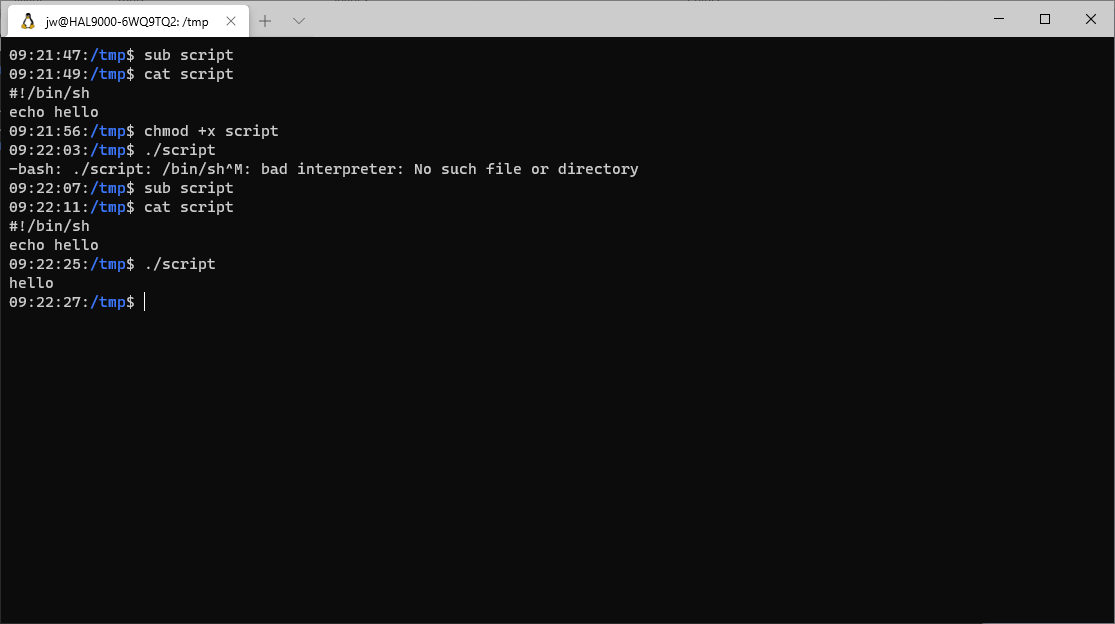
Replicated with enhancements from the following with hopes of improving findability and through search engines: TL;DR: Windows text files use \r\n (CRLF: carriage return, linefeed) for line termination; Unix text files use just \n. Edit the file and change the line terminators. Using Windows Subsystem for Linux (WSL), you may encounter the following error ifContinue reading “WSL: -bash: /bin/sh^M: bad interpreter: No such file or directory”
Category Archives: Uncategorized
Quickly Change Screen Resolution from the WSL Command Line

You can use the free QRes command line tool to change the screen resolution from a Windows Subsystem for Linux bash shell. I use this technique to capture screen shots at lower resolutions and then revert to my normal working resolution. First, download the software and put QRes.exe somewhere in your $PATH: Next, run theContinue reading “Quickly Change Screen Resolution from the WSL Command Line”
batcat: Syntax Highlighting Replacement for cat and more Commands
My time writing for another blog about rust led me to the batcat command, which provides a code syntax-highlighting replacement for the Unix cat and more commands, written in rust. bat — command-line utility in Rust // Lib.rs sudo apt install bat batcat lib.rs batcat wince It is not helpful in this example, but thereContinue reading “batcat: Syntax Highlighting Replacement for cat and more Commands”
Linux Shell Commands to Update Windows Subsystem for Linux
This blog post provides information about Linux shell commands that we can use to update Windows Subsystem for Linux and Linux itself. We can use the wsl.exe command with the –update argument to update WSL, but we need to use an elevated command shell. For this we can use the runas.exe command, but we haveContinue reading “Linux Shell Commands to Update Windows Subsystem for Linux”
Introducing rustapopoulos.com, another blog about programming with rust.
I started a separate blog about programming with rust. rustapopoulos.com – Yet another blog about programming with rust
Access Windows “God” Mode from Windows Subsystem for Linux
You can use the technique in the following script to access Windows “God” mode from a bash shell script running under Windows Subsystem for Linux (WSL). There may be a better way, preferably a command line argument to explorer.exe that does not depend on the existence of a file system directory for this purpose. Update:Continue reading “Access Windows “God” Mode from Windows Subsystem for Linux”
Open Remote (Github) Code Repositories in Visual Studio Code without Cloning
Microsoft’s github provides the Remote Repositories extension for the Microsoft Visual Code editor to open remote code repositories such as from Github without cloning those projects to your local system. First, I highly recommend that you use Windows Subsystem for Linux (WSL), with or without Visual Studio Code, but especially if you code in VisualContinue reading “Open Remote (Github) Code Repositories in Visual Studio Code without Cloning”
Access WSL File Systems Read-Only from a Browser
In Windows, I opened an .html file in the Windows Subsystem for Linux (WSL) /tmp directory (corresponding to \\wsl.localhost\Ubuntu-20.04\tmp on Windows) and found something unexpected in the address bar: file://wsl.localhost/Ubuntu-20.04/ followed by the Unix file system path to the file. Apparently, wsl.localhost works like a webserver with directory browsing enabled, from which you can accessContinue reading “Access WSL File Systems Read-Only from a Browser”
One Way to Run New Windows Applications from the Command Line
One of the annoying things about many modern Windows applications is that it is not easy to locate and invoke their executables. For example, how do you launch Windows Sound/Voice Recorder from the command line in Windows 10? Here is one way to find out how. You can run explorer.exe shell:AppsFolder to open the ApplicationsContinue reading “One Way to Run New Windows Applications from the Command Line”
Investigate Commands in WSL Bash Shells
This blog post contains guidance for gathering information about commands available in bash shells, specifically under Windows Subsystem for Linux (WSL). TLDR: Use type, which, and file to determine whether a command is an alias or a function or where it is and its type. To my knowledge, you can invoke four types of commandsContinue reading “Investigate Commands in WSL Bash Shells”
 wslguy.net