
This blog post provides some guidance for cleaning up Microsoft Windows. Add or Remove Programs Use Windows Add or remove programs to remove all programs that you do not consciously use. Turn Windows Features on or off Use Turn windows features on or off to remove unnecessary functionality. Update Windows, Drivers, and Programs Use WindowsContinue reading “Cleanup Microsoft Windows”
Category Archives: Uncategorized
Migrate Email Hosting to Proton

This blog post provides some guidance for migrating email hosting on personal domains to Proton, such as to migrate from Microsoft or google. In 2025, I am trying to reduce my reliance on big tech, and encouraging others to do the same. Planning Incorrect configuration could result in lost email. Understand the entire process beforeContinue reading “Migrate Email Hosting to Proton”
Configure Fedora Linux Bash Shell and Terminal
This blog post provides some guidance for configuring the bash shell and Christian Hergert’s Terminal 47.10 that come with Fedora Linux. Configuring the Terminal software seems relatively straightforward, and also provides a method to learn and set keyboard shortcuts. Press Super (Windows) and type term to find Terminal, then right-click and select Preferences. Alternatively, whileContinue reading “Configure Fedora Linux Bash Shell and Terminal”
Use rclone to Mount Proton Drive in Fedora Linux
This blog post describes one to mount an entire Proton Drive onto a Fedora Linux file system. A better alternative might be to create a directory on the Proton Drive, and to share only that directory. First, create a directory to represent the Proton Drive. Change group to the group of a user that willContinue reading “Use rclone to Mount Proton Drive in Fedora Linux”
Quick Fedora Orientation
You can use the mouse to interact with the GNOME environment that Fedora provides, starting with the icons at the top left and top right. You can also use keyboard shortcuts. At least once, a desktop machine did not seem to wake from sleep, so I disabled automatic sleep. When I switch from Fedora backContinue reading “Quick Fedora Orientation”
Installing Fedora Linux
This blog post is a continuation of: Installation Process The easiest process to install Fedora appears to be as follows: Partitions A previous post provided some guidance regarding partitions: USB Drive Use the Fedora Media Writer exe to write the installation software to the USB drive. This will install mediawriter.exe to something like C:\Program FilesContinue reading “Installing Fedora Linux”
Preparing to Install Linux
This blog post is a continuation of: Once we have an overall approach – experiment with dual-booting Windows and Fedora on a secondary machine – we need to prepare a few details before we can install Linux. Disks, Partitions, Boot Partitions, and Boot Loaders The operating system, whether Windows or Linux, provides an abstraction ofContinue reading “Preparing to Install Linux”
Planning to Move Away from Big Tech in 2025
In 2025, to the extent possible, I will move away from major software, hosting, social media, and cloud platforms. My context is that of a developer familiar with Windows, Windows Subsystem for Linux, Visual Studio Code, and Microsoft Office including OneDrive. I will use open source software, local devices, and Proton to replace existing paidContinue reading “Planning to Move Away from Big Tech in 2025”
WSL Bash CD Enhancement to Track Directories Across Sessions
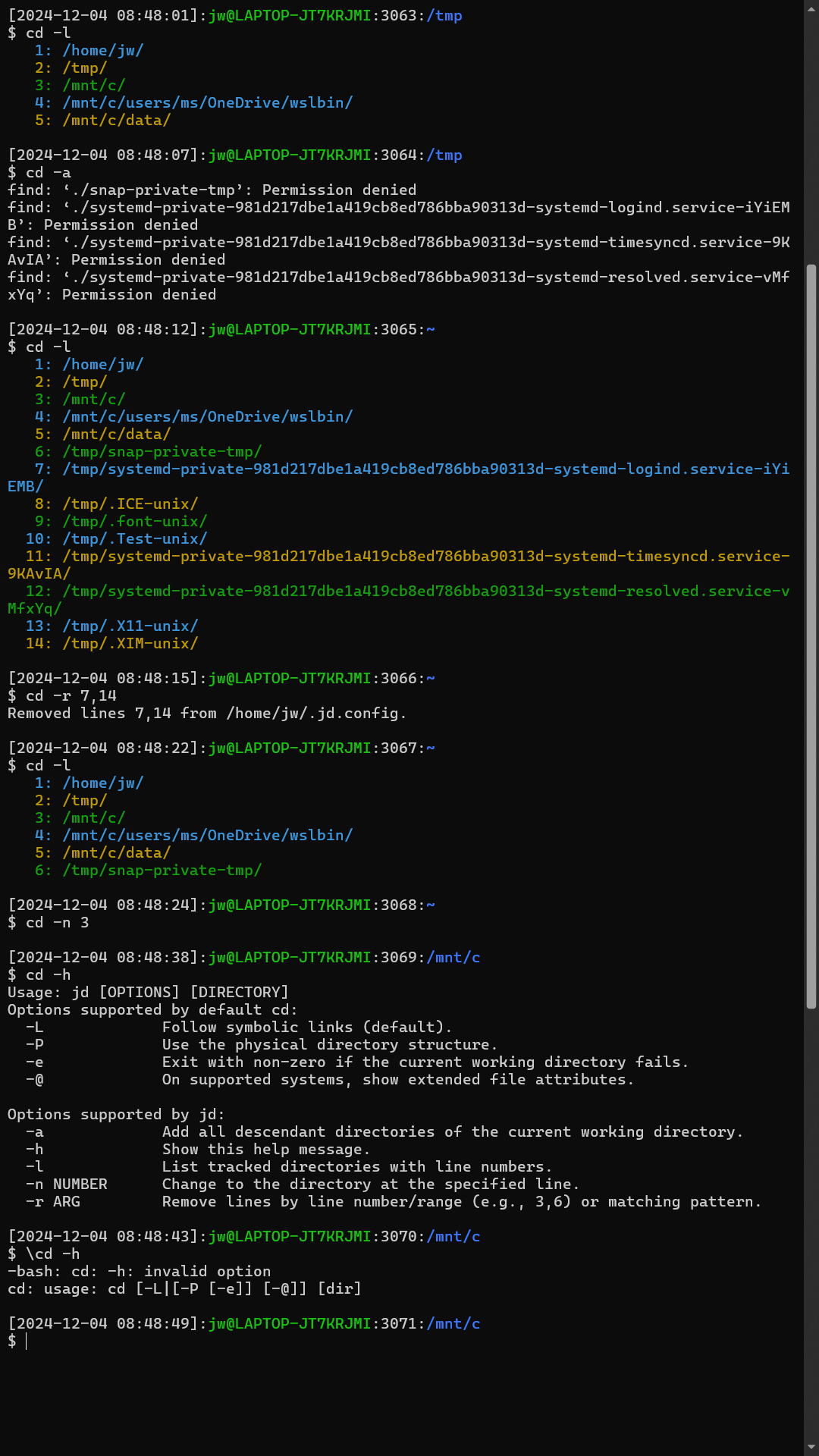
This blog post introduces the jd function that enhances the cd (change directory) command for Bash shells under WSL to make it easier to access past working directories without the need to remember or type their paths, as well as to allow typing and pasting Windows paths. You can use the jd function just asContinue reading “WSL Bash CD Enhancement to Track Directories Across Sessions”
WSL/Bash/Linux Cheat Sheet

ChatGPT wrote a cheat sheet of commands available in Bash under WSL (Linux). You should be able to generate cheat sheets about anything, but if there is much content, you need to break the process into phases. Step 1: Create Lists of Commands Step 2: Create Markdown Tables Step 3: Merge and Sort Step 4:Continue reading “WSL/Bash/Linux Cheat Sheet”
 wslguy.net